
Start with a role-based competency matrix built on 3 to 5 proficiency levels and behavioral anchors — it's the fastest structure to score, customize, and connect to hiring and development. Open an editable Excel or Google Sheets version, drop in your first pilot role, and write anchors using observable verbs. Success looks like this: managers describing performance with specific behaviors instead of vague impressions, and every gap paired with a next-step development action.
TL;DR:
- A competency model should have 3 to 5 distinct proficiency levels with observable, behavior-based anchors to ensure clear, measurable performance expectations.
- Focus on only 8 to 12 competencies per role to keep assessments practical and evidence-driven, avoiding vague or overly complex criteria.
- Use targeted calibration sessions early in the process to reconcile scoring differences and prevent widespread ambiguity across departments.
- Regularly update the model annually or upon significant role changes, with proper version tracking, to maintain relevance amid shifting skill demands.
- Connecting the competency framework to hiring, performance reviews, learning, and succession planning maximizes its impact and ensures organizational consistency.
Table of Contents
- What Goes Into a Usable Competency Model Template
- How Do You Customize a Competency Model Template Step by Step?
- What Do Role-Based Competency Examples Actually Look Like?
- How Should You Score and Prioritize Competency Gaps?
- What Does a Realistic Rollout Timeline Look Like?
- A Practical Playbook Perspective on Competency Language
- How Do You Train Employees on a New Competency Model?
- How Do You Connect a Competency Model to Other HR Processes?
- How Often Should You Update a Competency Model?
- When Should You DIY a Competency Model vs. Bring in Outside Help?
- How True Colors Helps Turn a Template Into Real Culture Change
- Sources
- FAQ
What Goes Into a Usable Competency Model Template
A template that works is one you can open and immediately know which cells to touch. Most fail not because the categories are wrong, but because the file is either too sparse to score anything or so dense nobody finishes filling it out.
Competencies in a working framework fall into three groups. Core competencies apply to every employee regardless of role, things like communication and problem solving. Functional or technical competencies are specific to a job family, like data analysis for an analyst or code review for an engineer. Leadership competencies apply only to people managers and supervisors, covering skills like delegation and conflict resolution. The OECD's core competency framework uses this same three-part split, and it holds up because it mirrors how organizations actually make decisions about people: everyone gets measured on the core set, but technical and leadership competencies only apply where they're relevant.
A usable file needs these columns, no more and no less:
- Competency name and a one-sentence definition anyone can understand without a glossary
- Behavioral anchors written out for each proficiency level
- Example behaviors or evidence prompts a manager can point to
- A scoring field, usually a numeric scale matched to your proficiency levels
- An importance or priority flag, since not every competency matters equally for every role
- A notes or version field to track why an anchor changed and when
Stick to a few proficiency levels, typically labeled Foundational, Intermediate, Advanced, and Expert, to provide clear behavioral distinctions. The anchors are what separate the levels. If your Intermediate and Advanced anchors both say "communicates well with the team," you haven't built levels, you've built decoration. Each level needs a distinct, observable behavior that a manager could point to in a real meeting.
Keep one master file, add a version number to the filename or a tab, and maintain a short change log. A one-line note like "March 2026: revised Sales Level 3 anchor after calibration feedback" saves you from re-litigating decisions every review cycle.
How Do You Customize a Competency Model Template Step by Step?
Customization fails most often when teams try to build for the whole organization at once. Work in this order instead.
- Choose your model pattern first. A flat model applies the same core competencies to everyone with light role variation. A dimensioned model separates competencies by knowledge, skill, and application. A seniority-based model layers expectations by level (individual contributor, senior, lead, manager). Diagnostic tools like Centranum's competency model design worksheet can help you decide quickly: pick flat if you're under 200 employees and want speed, dimensioned if you need granular skill tracking, seniority-based if promotion decisions are your main use case.
- Pick two or three pilot roles, not twenty. Choose roles with a clear manager and enough headcount to test scoring patterns, but small enough that a mistake doesn't ripple through the whole company.
- Assemble subject matter experts and manager representatives. You need people who actually do the job and people who evaluate it. Skipping either group produces anchors that sound right on paper and confuse everyone in practice.
- Draft anchors using observable verbs. "Understands stakeholder needs" is not observable. "Documents stakeholder requirements before a project kickoff and revisits them at each milestone" is. The Department of Labor's competency model clearinghouse frames this as one of the core steps in any credible model build: definitions only earn their place once they're tied to something a manager can point to.
- Cap competencies per role at 8 to 12. More than that and assessments take too long, and managers start rating on gut feel instead of evidence.
- Decide your assessment approach and scoring rules now, including how to handle "not applicable." Waiting until after the pilot to figure out scoring guarantees inconsistent data.
- Run a calibration panel before rolling out broadly. Bring managers together, compare how they scored the same hypothetical employee, and reconcile the gaps. This step catches ambiguous phrasing before it spreads across every department, a lesson the Department of Labor's guidance repeats because it's the single most common miss in template rollouts.
Pro Tip: Write your Level 1 (Foundational) and Level 4 (Expert) anchors first, then fill in the middle. It's much easier to spot ambiguous language when you're stretching between two clear extremes than when you're writing all four levels in sequence.
What Do Role-Based Competency Examples Actually Look Like?
Abstract advice about behavioral anchors only clicks once you see how the language shifts by function. Here's a compact look at four common role families, showing the jump from Foundational to Expert.
- Engineering (Technical Competency: Code Quality). Foundational: "Writes code that passes assigned tests but requires senior review for edge cases." Expert: "Anticipates edge cases during design, writes tests before code, and mentors others on defensive coding patterns."
- Sales (Functional Competency: Consultative Selling). Foundational: "Follows a standard pitch script and answers common objections with provided talking points." Expert: "Diagnoses buyer priorities in the first call and adapts the entire sales narrative to the client's stated business outcomes." Consultative selling skills like these map closely to what professional sales consultancy training programs emphasize when building out a functional competency track for a sales team.
- Customer Success (Core Competency: Problem Resolution). Foundational: "Escalates unresolved issues within one business day using the standard ticket template." Expert: "Resolves complex, cross-departmental issues directly and proactively flags patterns to product teams before they become recurring complaints."
- Operations (Functional Competency: Process Improvement). Foundational: "Follows documented standard operating procedures without deviation." Expert: "Redesigns broken workflows, quantifies the time or cost saved, and trains other teams on the new process."
Language shifts by function because the evidence of mastery looks different in each job. A sales expert's mastery shows up in conversation; an engineer's shows up in code. What stays constant is the level-separation rule: each step up should describe a behavior a manager could observe in a normal week, not a trait or attitude.
One thing worth calling out: a well-designed framework gives HR and managers a common language, shifting performance conversations away from subjective impressions and toward specific, observable behaviors used consistently in hiring, review, and development, according to the OECD's framework guidance. That shift alone is often what separates a competency model people actually reference from one that sits unused in a shared drive.
How Should You Score and Prioritize Competency Gaps?
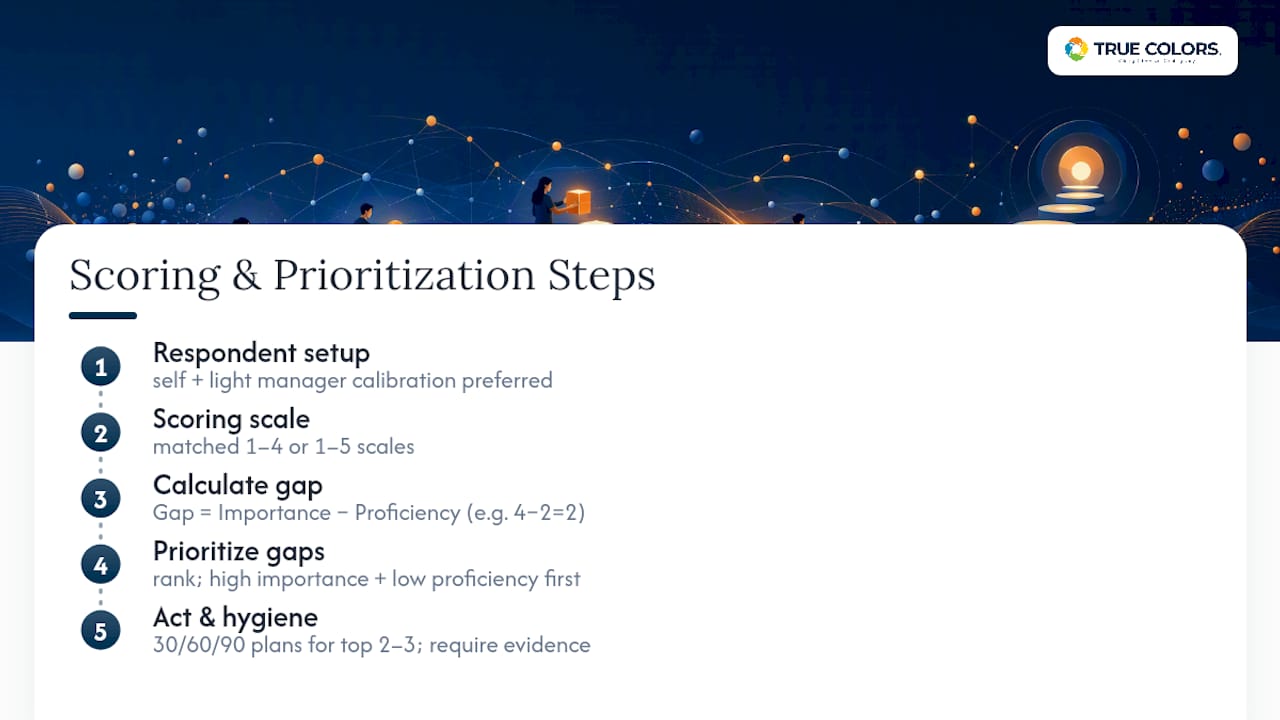
Three respondent setups are common: self-assessment only, manager assessment only, or both combined. Self plus light manager calibration is the strongest default for most organizations, especially for priority or high-turnover roles, because it catches the blind spots that pure self-rating misses without requiring a full 360-degree process for every position.
The scoring math itself should stay simple. Use matched scales for importance and proficiency, typically the same 1 to 4 or 1 to 5 range so the numbers are directly comparable. Then calculate:
Gap = Importance − Proficiency
A competency rated Importance 4, Proficiency 2 produces a gap of 2. A competency rated Importance 2, Proficiency 1 produces a gap of only 1, even though the raw proficiency score is lower. The rule that matters is that high importance paired with low proficiency is always the highest development priority, regardless of how the raw numbers look in isolation.
Once gaps are ranked, build 30/60/90 day plans against the top two or three for each employee, not every gap at once. Data hygiene matters here: don't average scores across a team without checking sample size, and require an evidence prompt (a specific example, not just a number) alongside every rating. High-quality templates typically pair a summary self-assessment with a more detailed, role-specific one, using a degree-of-mastery scale plus a priority field, exactly for this reason, according to the University of Minnesota's self-assessment template guidance. Numbers without evidence turn into guesswork the moment someone challenges a rating.
What Does a Realistic Rollout Timeline Look Like?
Plan for several months from first draft to full rollout, allowing sufficient time for calibration and integration. Rushing this compresses the calibration step, and calibration is where most models either earn trust or lose it permanently.
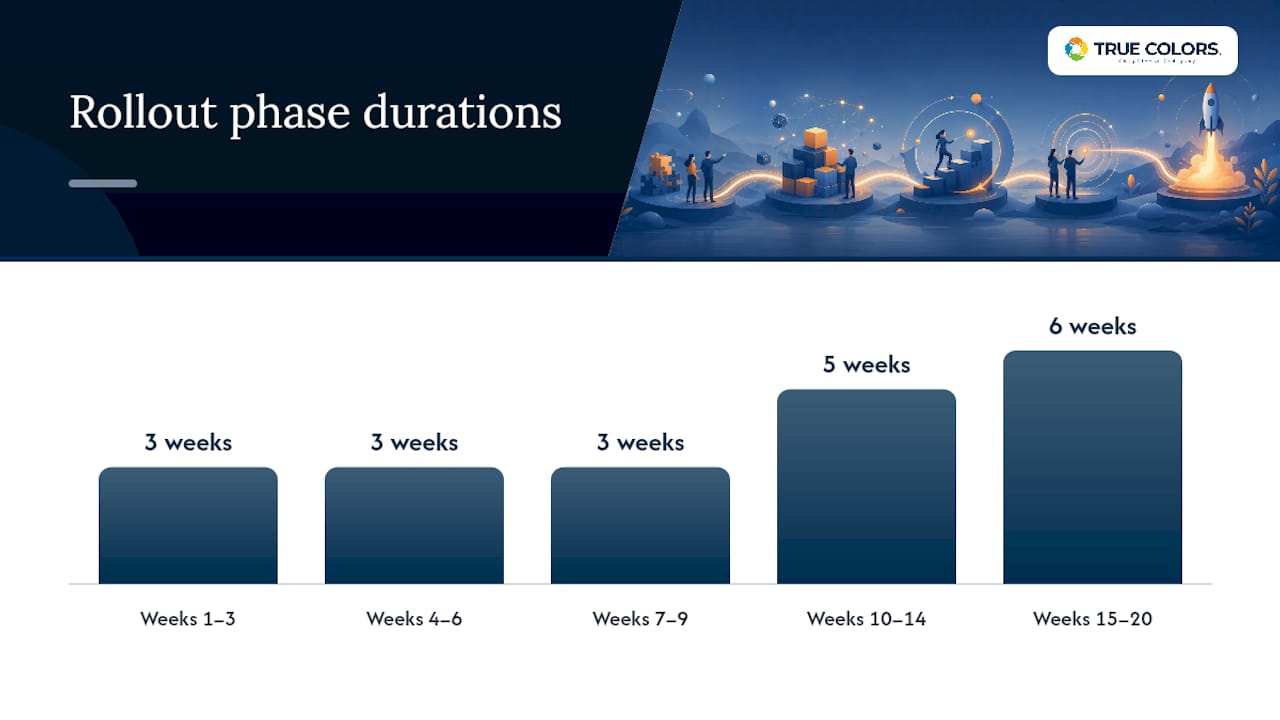
A workable phased plan looks like this:
- Weeks 1 to 3: Define categories, select your model pattern, and draft the first version of anchors for pilot roles.
- Weeks 4 to 6: Run the pilot with two or three roles, collect self and manager scores, and gather feedback on anchor clarity.
- Weeks 7 to 9: Hold calibration workshops where managers compare scores on the same test cases and reconcile disagreements.
- Weeks 10 to 14: Revise anchors based on calibration findings, then expand to additional role families.
- Weeks 15 to 20: Integrate the finalized model with recruitment, learning and development curricula, performance reviews, and succession planning.
This sequencing follows the same stages the Department of Labor's clearinghouse recommends: needs definition, model pattern selection, role mapping, anchor development, and systems integration, generally landing in that same 3 to 5 month window for a thorough build.
Governance needs named owners, not a committee that meets once and disappears. Assign a model owner (usually an HR or L&D leader), a standing SME panel for anchor updates, an HR admin who manages the file and version history, and a calibration committee that reconvenes quarterly.
Pro Tip: Schedule your first calibration workshop before you finish writing anchors for every role. Catching ambiguous phrasing on two pilot roles is a fast fix. Catching the same problem after it's been copied across fifteen roles is a much bigger cleanup job.
Before calling the rollout complete, confirm the model links to at least four systems: recruitment screening criteria, L&D curriculum design, performance review templates, and succession planning discussions. A model that lives only in a shared drive isn't governance, it's an archive.
A Practical Playbook Perspective on Competency Language
Documents don't change behavior. Language does, but only if it's specific enough to act on. The gap between a competency model that gets referenced weekly and one that gathers dust almost always comes down to phrasing: does the anchor describe a behavior a manager saw this week, or a trait they're guessing at?
Behavioral-style phrasing works because it gives managers a script for feedback conversations they'd otherwise avoid. Instead of "be more collaborative," an anchor tied to observable action, phrased in the language your teams already used to talk about work, gives a manager something concrete to reference in a one-on-one. That's the real shift: from a personal awareness that something needs to improve, to an aligned, specific action everyone recognizes and repeats.
Three checkpoints turn a scored gap into a behavior-change intervention. First, pair every high-priority gap with one specific behavior to practice in the next 30 days, not a vague development goal. Second, name the evidence a manager will look for. Third, revisit it in the next one-on-one, not the next annual review. Related reading on building team confidence and competence covers how these smaller, repeated checkpoints compound over a quarter.
— Theresa
How Do You Train Employees on a New Competency Model?
Rolling out a competency model as a memo is the fastest way to guarantee it gets ignored. Communication has to happen in layers, starting before the model is finalized, not after.
Brief managers first, and give them the "why" before the "what." A manager who understands that the model exists to make feedback conversations more concrete, not to create a new compliance chore, will introduce it to their team with a very different tone than one who got a link to a spreadsheet an hour before rollout.
Run a short, live walkthrough rather than relying on a written guide alone. Show one real (or anonymized) example of a gap analysis and the 30/60/90 plan it produced. Abstract explanations of proficiency levels rarely land; a worked example almost always does.
Give employees a chance to self-assess before their manager rates them, and be explicit that self and manager scores are expected to differ sometimes. Treating a mismatch as useful data, rather than a disagreement to resolve immediately, keeps the calibration conversation calmer.
Finally, put the model somewhere employees will actually see it again: linked from the performance review template, not buried in an onboarding folder they opened once. Training isn't a single session. It's a habit of returning to the same behavioral language often enough that it becomes how the organization talks about performance, period.
How Do You Connect a Competency Model to Other HR Processes?
A competency model that sits apart from performance management, recruitment, and learning and development is just a document. Its value comes from the connections.
For performance management, replace vague review categories with the same competency names and behavioral anchors from your template. If Level 3 "Process Improvement" is defined in the model, that exact definition should appear in the review form, not a paraphrased version someone wrote from memory.
For learning and development, map each competency gap to a specific learning action, not a generic course catalog link. A gap in "Consultative Selling" should point to a defined coaching session or shadowing assignment, not a self-paced module nobody finishes. A competency-based hiring playbook approach applies the same logic upstream, using the model's language during interviews so the standards employees are hired against match the standards they're later developed against.
For recruitment, use the functional and leadership competencies as your interview scorecard categories. This closes a loop that a lot of organizations leave open: hiring for one set of qualities and then evaluating performance against a completely different set once someone is on the team.
For succession planning, competency gap data becomes the evidence base for readiness conversations, replacing guesswork about who's "ready" for the next role with a documented gap history.
How Often Should You Update a Competency Model?
A competency model isn't a one-time deliverable. Review it on a fixed cadence, typically annually for most competencies and sooner for fast-changing technical roles, where the underlying tools or methods shift faster than a yearly cycle can track.
Trigger an off-cycle review when a role changes significantly, a new function is added to the organization, or calibration sessions repeatedly surface the same complaint about an anchor being unclear. Repeated calibration friction on the same competency is a stronger signal to revise than a single manager's complaint.
Keep the version log active. Every change should note what was revised, why, and who approved it, so a manager questioning an old score can see exactly what changed and when. Skills demand is shifting quickly enough that competency frameworks increasingly need a forward-looking layer too. The World Economic Forum's Future of Jobs reporting points out that mapping current proficiency alongside anticipated future skill needs is becoming a strategic requirement, not an optional add-on, for workforce planning to stay relevant.
Build the review into your governance calendar rather than waiting for a complaint to trigger it. A calibration committee that meets quarterly, as recommended earlier, is also the natural body to flag when a full anchor revision is overdue.
When Should You DIY a Competency Model vs. Bring in Outside Help?
Small organizations with straightforward roles and low change resistance can usually pilot a template internally using the steps above. Bring in outside facilitation when role complexity is high, when leadership alignment is shaky, or when a small HR team lacks bandwidth to run calibration properly. Skipping calibration, or building the model without embedding it into hiring and development, are the two fastest ways to end up with a document nobody trusts.
How True Colors Helps Turn a Template Into Real Culture Change
A template gets you started. Turning it into consistent leadership behavior across an organization is a different job, and it's the one most internal pilots stall on once calibration reveals how differently managers actually interpret the same anchor. True Colors International works with organizations at exactly that stage, past the spreadsheet and into the harder work of aligned action.

The Connected Leadership Program builds leadership competencies into habit managers actually practice, not just definitions they read once during rollout. For hiring, True Colors' competency-based hiring playbook work helps translate your functional and leadership anchors into interview scorecards that hold up in practice. And an employee experience survey gives you a way to check whether the model is actually shifting how people experience leadership day to day, not just whether the scores moved.
Worth being direct about scope: this work does not involve selling competency-tracking software or licensing a platform. The work is facilitated, human-led capability building, workshops, calibration facilitation, and leadership development designed to make the language in your template something managers actually use in real conversations. If your organization has the template but needs help embedding it into how leaders behave, explore corporate consulting and coaching solutions and start a conversation about where your rollout stands.
Sources
- OECD core competency framework (guidance)
- University of Minnesota: self-assessment template and instructions
- World Economic Forum: The Future of Jobs Report 2025
FAQ
How do you make a competency model?
Define your categories (core, functional, leadership), choose a model pattern, draft behavioral anchors with observable verbs for 3 to 5 proficiency levels, map competencies to pilot roles, and run a calibration panel before rolling out broadly.
What is an example of a competency model?
A role-based matrix for a customer success role might list "Problem Resolution" as a core competency, with anchors ranging from "escalates issues within one business day" at the Foundational level to "resolves complex cross-departmental issues directly" at the Expert level.
What are the components of a competency model?
A usable model includes competency categories, clear definitions, behavioral anchors per proficiency level, example behaviors or evidence, a scoring field, and an importance or priority rating used for gap analysis.
What are core competencies?
Core competencies are the skills and behaviors expected of everyone in an organization regardless of role, such as communication, problem solving, and collaboration, distinct from functional or leadership competencies that apply only to specific roles or people managers.